PSK Match ist eine macOS-App für Funkamateure, die aktuelle FT8-Dekodierungen aus WSJT-X oder SDR-Control mit Empfangsmeldungen von PSK Reporter abgleicht.
English below
Welche Stationen höre ich gerade – und welche davon hören auch mich?
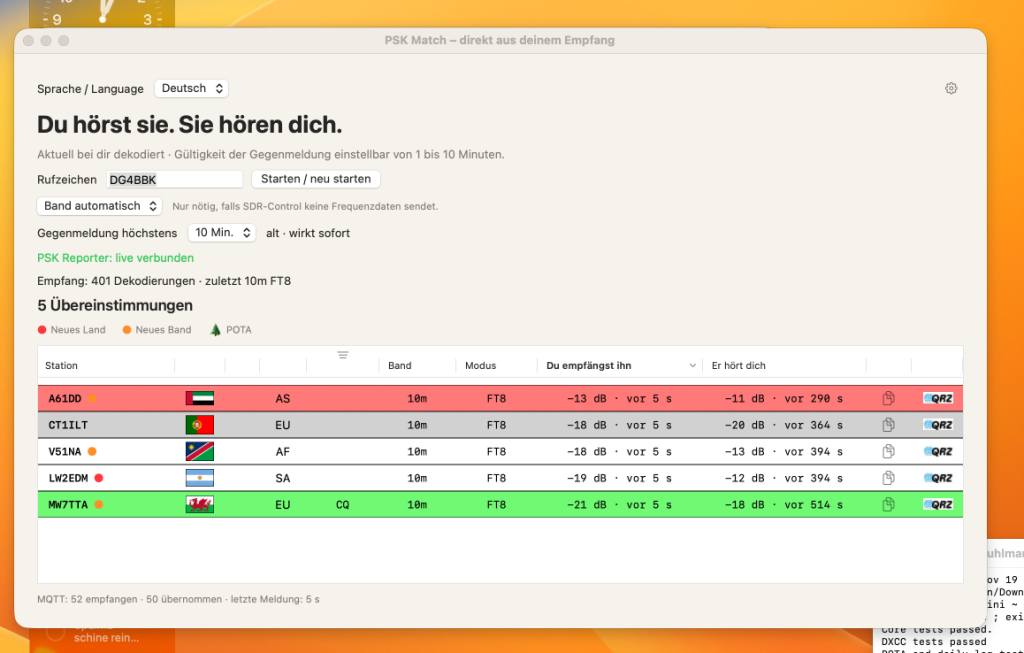
PSK Match gleicht die aktuellen Dekodierungen aus WSJT-X oder SDR-Control mit den Empfangsmeldungen von PSK Reporter ab. Die Tabelle zeigt die Signalrapporte für beide Richtungen. So siehst du auf einen Blick, bei welchen Stationen sich ein Anruf lohnen könnte.
Direkte Anrufe an dein Rufzeichen erscheinen sofort rot, auch ohne PSK-Reporter-Meldung. Grün hebt CQ-Rufe hervor. Wenn du gezielt auf DXCC-Jagd gehst, markiert ein roter Punkt ein noch unbestätigtes DXCC-Gebiet und ein orangefarbener Punkt ein bereits bestätigtes Gebiet, das dir auf dem aktuellen Band noch fehlt. Ein 🌲 kennzeichnet POTA-Aktivierungen, die kürzlich CQ POTA gerufen haben.
POTA-Stationen sowie für dich neue DXCC-Gebiete und Bandpunkte kannst du auf Wunsch auch ohne Gegenmeldung anzeigen lassen. Deinen DXCC-Stand kannst du per ADIF übernehmen und manuell ergänzen. Die Oberfläche lässt sich zwischen Deutsch und Englisch umschalten.
Download und Start
ZIP-Datei herunterladen und entpacken. Dann im entpackten Ordner Bauen-und-Starten.command ausführen. Das Skript erstellt und startet die Mac-App.
Entwickelt von Jan Kuhlmann, DG4BBK. Viel Spaß und gute QSOs! 73
Systemvoraussetzungen
- Mac mit macOS 13 Ventura oder neuer. Das Startskript erstellt die App für den jeweiligen Mac mit Apple Silicon oder Intel-Prozessor.
- Apple Command Line Tools zum Erstellen der App aus dem ZIP-Download. Falls sie fehlen, öffne das Terminal und führe
xcode-select --installaus. Starte danach Bauen-und-Starten.command erneut. - WSJT-X oder SDR-Control als Quelle für die Live-Dekodierungen. Das Funkprogramm muss die Dekodierungen per UDP an PSK Match senden. Laufen beide Programme auf demselben Mac, verwende
127.0.0.1und standardmäßig Port2238. - Internetverbindung für die Empfangsmeldungen von PSK Reporter. Bei einer Firewall muss eine ausgehende Verbindung zu
mqtt.pskreporter.infoauf TCP-Port1886möglich sein.
English
Which stations am I hearing right now, and which of them can hear me too?
PSK Match compares live decodes from WSJT-X or SDR-Control with reception reports from PSK Reporter. The table shows signal reports in both directions, so you can quickly see which stations might be worth calling.
Stations calling your callsign are highlighted in red as soon as you decode them, even without a PSK Reporter spot. Green highlights CQ calls. If you’re chasing DXCC, a red dot marks an entity you haven’t confirmed yet, and an orange dot marks a confirmed entity you still need on the current band. A 🌲 marks stations that have recently called CQ POTA.
You can choose to show POTA stations, new DXCC entities, and new band slots even without a PSK Reporter spot. Import your DXCC confirmations from an ADIF file or add them by hand. The app is available in English and German.
Download and launch
Download and unzip the archive, then run Build-and-Run.command from the extracted folder. The script builds and launches the Mac app.
Developed by Jan Kuhlmann, DG4BBK. Enjoy the app and good DX! 73
System requirements
- A Mac running macOS 13 Ventura or later. The launch script builds the app for the Mac it runs on, whether it uses Apple Silicon or an Intel processor.
- Apple Command Line Tools to build the app from the ZIP download. If they’re missing, open Terminal and run
xcode-select --install. Then run Build-and-Run.command again. - WSJT-X or SDR-Control as the source of live decodes. Configure your radio software to send decodes to PSK Match over UDP. If both apps run on the same Mac, use
127.0.0.1and the default port2238. - An internet connection for PSK Reporter reception reports. If you use a firewall, allow outgoing connections to
mqtt.pskreporter.infoon TCP port1886.

